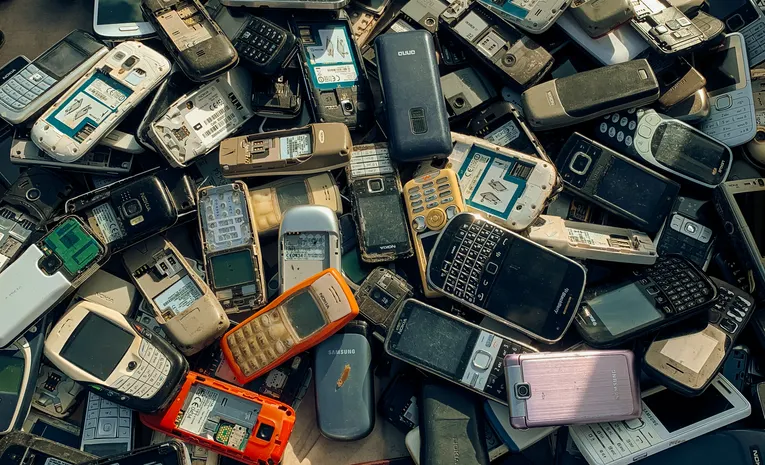
How to Safely Dispose of Old Electronics: An E-Waste Guide
Old phones, laptops, and cables have a way of piling up in drawers and closets long after they stop being useful. Throwing them in the regular trash is both environmentally harmful and, in many places, actually illegal. Before disposing of an old laptop, it’s worth checking whether it just needs a clean or a performance refresh rather than replacement entirely. This guide covers how to responsibly dispose of old electronics, protect your personal data first, and even get some value back from devices you no longer need.
Why E-Waste Disposal Matters
E-waste is the fastest-growing solid-waste stream in the world, yet less than 25% of all electronic waste generated in the United States is actually recycled properly, with the rest ending up incinerated or in landfills. Electronics contain valuable, reusable materials such as metals, glass, and plastics, alongside genuinely toxic substances like lead, mercury, and cadmium that can contaminate soil and groundwater if disposed of improperly.
The Energy Case for Recycling
Recycling one million laptops saves roughly the energy equivalent of the electricity used by more than 3,500 US homes in a year. Mining raw copper, gold, and aluminium for new devices is significantly more resource-intensive than recovering the same materials from recycled electronics.
Step One: Always Erase Your Data First
Before any device leaves your possession, whether for recycling, donation, or resale, run a full factory reset. This is the essential first step for phones, laptops, and tablets, and takes only a few minutes through the device’s settings menu.
When a Factory Reset Isn’t Enough
A standard factory reset stops casual access to your data, but it won’t necessarily stop a motivated data-recovery specialist with the right tools. For devices that held genuinely sensitive information, physically removing the storage drive and either keeping it separately or destroying it (a drill through the drive, with safety goggles, is a commonly recommended method) provides a stronger guarantee.
Option One: Manufacturer Take-Back Programmes
Many major manufacturers, including Apple and Best Buy, run their own electronics recycling and trade-in programmes. These sometimes offer store credit or a discount toward a new purchase, making them a convenient first option to check before looking elsewhere.
Option Two: Certified E-Waste Recyclers
Independent recycling centres handle a wider range of electronics than most manufacturer programmes. Look specifically for the e-Stewards certification, which indicates a recycler meets rigorous, responsible standards for handling e-waste rather than simply exporting it elsewhere.
Option Three: Donation for Working Devices
If a device is still functional, donating it extends its useful life and keeps it out of the waste stream entirely. Many charities and schools accept working electronics, and some even accept devices needing minor repairs.
Option Four: Trade-In and Buyback Kiosks
Self-serve kiosks, commonly found in retail locations, buy back used electronics, primarily mobile phones, directly from consumers. Devices are typically either resold to refurbishers or broken down by recyclers for their component materials.
Special Handling: Batteries
Rechargeable batteries should never go in regular household recycling due to fire risk. Dedicated battery drop-off programmes, widely available at many retail and community locations, handle these safely and separately from general e-waste.
Special Handling: Monitors and Screens
Older CRT monitors and televisions contain higher volumes of hazardous materials than modern flat screens, and typically incur specific handling requirements or fees at recycling events due to this. Check ahead, since some facilities charge more for these items than for standard laptops or phones.
Why You Should Consider Repair Before Disposal
Before writing off a device entirely, a repair may extend its useful life significantly, reducing e-waste at the source rather than managing it after the fact. Right-to-repair advocacy groups provide guides for common repairs across many device types.
Legal Requirements Vary by Location
Roughly half of US states have passed laws specifically requiring electronics recycling rather than standard trash disposal. Checking local regulations, or a local government’s dedicated e-waste page, clarifies what’s actually required, as opposed to simply recommended, in your specific area.
A Simple Disposal Checklist
- Back up and then factory reset the device before doing anything else
- Check if the manufacturer offers a take-back or trade-in programme first
- Look for an e-Stewards certified recycler if the manufacturer doesn’t take it back
- Donate working devices rather than recycling them if they still have useful life left
- Handle batteries and CRT screens separately from general electronics
Frequently Asked Questions
Can I just throw old electronics in the regular trash?
In many regions this is actually illegal due to the hazardous materials involved, and even where it isn’t strictly prohibited, it contributes directly to landfill contamination that proper recycling avoids.
Is a factory reset enough to protect my personal data?
For most casual scenarios, yes. For devices that held highly sensitive information, physically removing or destroying the storage drive offers a stronger level of protection than a factory reset alone.
Conclusion
Responsible e-waste disposal takes only a little more effort than throwing a device in the trash, and the environmental difference is substantial. Erasing your data first, then choosing a take-back programme, certified recycler, or donation depending on the device’s condition, keeps both your information and the planet a little safer.
About the Author